 prusaprinters
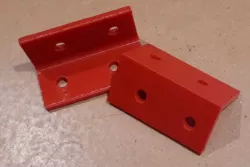
Basic parametric right-angle bracket
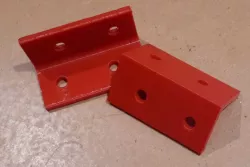
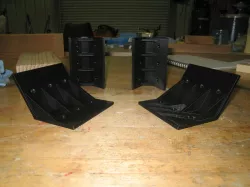
I was making a small enclosure out of acrylic and needed some right-angle brackets to hold the thing together. It turned out to be as easy to design these in OpenSCAD as to find somebody else's design that would do the job for me.The .scad file has parameters giving choices for the basic dimensions - length, width, thickness, bolt-hole size. There is a parameter to choose whether to have the bolt-holes aligned with each other, or staggered to stop bolts clashing.Version 2 of the .scad file includes an option to make a half-width bracket, with only one bolt hole.The .stl files are the dimensions I used for my project.My brackets were printed in PLA and do the job fine.Print SettingsPrinter Brand:PrusaPrinter: I3 MK3SRafts:NoSupports: NoResolution:0.2Infill: 20%Filament: eSun PLA+ Several! Notes: If you want to apply a lot of pressure from the mounting bolts, you could increase the infill to make the brackets stronger. My little job is happy with 20%. Category: DIY
Direct link to the original creator's page
More from viragor
 prusaprinters
 thingiverse
 prusaprinters
 thingiverse
 thingiverse
 thingiverse
Similar Models
thingiverse
 prusaprinters
 prusaprinters
 prusaprinters
 prusaprinters
 prusaprinters
 prusaprinters
 prusaprinters
Model Specifications
Frequently Asked Questions
How do I download Basic parametric right-angle bracket?
Click the "View on prusaprinters" button above to visit the original model page on prusaprinters. You can download the STL file directly from the creator's page for free.
What 3D printer can I use for this model?
This STL file is compatible with most FDM 3D printers (Creality Ender 3, Prusa MK3S+, Bambu Lab, etc.) and resin printers (Elegoo, Anycubic). Check the original page for recommended print settings and materials.
Is this 3D model free to download?
Yes, this model is available as a free download on prusaprinters. Some creators accept tips or donations.
Can I modify this STL file?
Most STL files can be modified using free software like Blender, TinkerCAD, or Meshmixer. Check the license on the original prusaprinters page to see if modifications are permitted by the creator.