 Thingiverse
Balsa Blade Propeller Mold V3.6 (April 2023)
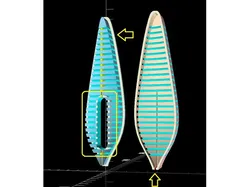
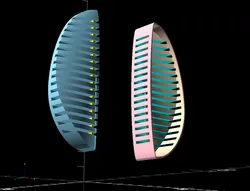
Update August 2024: An updated version is posted at https://www.thingiverse.com/thing:6720495. Both left-handed and right-handed propellers are supported. Sept. 30, 2023: Posted a build guide at https://www.youtube.com/watch?v=7WBZlx42M5Y April 10, 2023: Thanks to feedback from several Science Olympiad Flight teams, I have implemented a few helpful ideas in this v3.6 release, e.g. a channel to help glue CF stem to a blade easily and accurately; a flange to help pull the two molds apart; and more parameters on the Customizer UI to tweak. Glad to see many propellers that were built from this program performed so well in the SO Flight competition. Those winning flights were simply amazing! Intro Here is an OpenSCAD script for creating indoor flight propeller molds. Many parameters like Pitch/Diameter, Centerline Location, Mold Thickness, etc. are adjustable in OpenSCAD's customizer panel. Propeller blade angle is true helical. Flaring propeller is possible. Blade axis is straight. Good for alignment. There are lots of other adjustment possibilities. Open up the .scad files in OpenSCAD and see. Usage 0> Download and install OpenSCAD at https://openscad.org/. Download PropBlade_Mold_xx.scad and Larrabee_Boor.scad files into one of your local folders. Start OpenSCAD and open PropBlade_Mold_xx.scad. Select design parameters in OpenSCAD's Customizer panel based on your flight experience, or use default values as a good starting point. After render the model in OpenSCAD, generate a .stl file and bring it to your 3d printer. Print the mold with either PLA, PLA+, or your favorite filament.1>Use the 3d-printed male mold (without flange) as a template, cut multiple blades out of 1/32" balsa sheet.2>Wet these balsa blades thoroughly. 3>Put balsa blades into the female mold one by one with bathroom tissue under, in between, and above. Put the male mold on top of all.4>Weigh the whole stack down with a book or something. Wait half hour or so and change tissue.5>After changed tissue a few times, get rid of the tissue in between blades (leave the top and bottom ones), and wait for another few hours, or overnight.6> Check again to make sure all blades are completely dry.7> Prepare CF stems. Place a blade and then a stem into the same female mold. Put the male mold on top. Align the stem into the slot in the male mold. Through the open channel on the male mold, apply two or three drops of CA to hold the stem to the balsa blade (not to the mold!) After a few seconds, take the whole blade-stem assembly out and add a few more drops of CA to help secure the blade to the stem. Repeat for other blades.The formed blade-stem assemblies then go through another process to build up a propeller. For that, I use another 3d printed gadget, Propeller Pitch Gauge. Check it out at my design collection athttps://www.thingiverse.com/aeromartin/designsPlease hit the LIKE button if you like it! Good luck with your precision propellers!-AeroMartinhttp://StarImagineering.comChange Log: v3.6 Opened a channel to assist in gluing blade stem 4/9/2023 v3.5 Added flange on the male mold & more Customizer UI options 4/9/2023 v3.4 Added selectable parameter options on label text 4/8/2023 v3.3 Auto-locate text on the mold 4/1/2023 v3.2 Support Larrabee Blade Shape. (aka. blade platform, blade planform). Larrabee propeller blade shape was developed by a MIT Professor, Eugene Larrabee, for human powered airplanes. It was later adapted by Reg Boor for indoor airplane's propellers. This implementation is based on Boor's paper. (See reference in the code.) 3/10/2023 V3.0 Added "Wash out" angle setting. Visually, a few degrees of washout is very subtle. Aerodynamically, washout could yield that winning edge. 01/02/2023 V2.3 Added ventilation slots to speed up drying process. 11/24/2022V1.9 Original release. 11/12/2022
Direct link to the original creator's page
More from AeroMartin
![[Simple Print] Build A HatCam with RunCam6](https://bamax.es/uploads_v2/140/simple-print-build-a-hatcam-with-runcam6-xTiaB1Dx_200.webp)
![[Simple Print] Easy Sanding Block](https://bamax.es/uploads_v2/104/simple-print-easy-sanding-block-Jlh3GpPx_200.webp)
Similar Models
![[Indoor Free Flight] Balsa Blade Propeller Mold, August 2024](https://bamax.es/uploads_v2/137/indoor-free-flight-balsa-blade-propeller-mold-august-2024-Uen6jNXw_200.webp) Thingiverse
Thingiverse
 Thingiverse
 Thingiverse
 GrabCAD
 Printables
 Printables
 Printables
 Thingiverse
Model Specifications
Frequently Asked Questions
How do I download Balsa Blade Propeller Mold V3.6 (April 2023)?
Click the "View on Thingiverse" button above to visit the original model page on Thingiverse. You can download the STL file directly from the creator's page for free.
What 3D printer can I use for this model?
This model is compatible with most FDM 3D printers (Creality Ender 3, Prusa MK3S+, Bambu Lab, etc.) and resin printers (Elegoo, Anycubic). Check the original page for recommended print settings and materials.
Is this 3D model free to download?
Yes, this model is available as a free download on Thingiverse. Some creators accept tips or donations.
Can I modify this file?
Check the license (see original page) on the original Thingiverse page. Most STL files can be modified using free software like Blender, TinkerCAD, or Meshmixer.