 prusaprinters
Apple
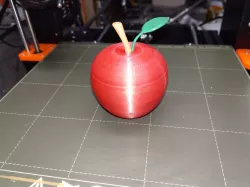
This one is mostly for fun, but also to try out some ideas in 3D CAD as well as printing a multi-part print in multiple colors. There are five parts total for this print.
The OnShape 3D CAD files for this are here :
https://cad.onshape.com/documents/66c4dd77b613d56d9863a09c/w/b871d4459792e304bf51f918/e/95f6e297d02eba135f73e7ab
Print instructionsPrint in PLA using the 3mf files provided.
You can of course print in any colors you like, but for a realistic look these are the colors I chose:
red : apple top and bottom
brown : stem
any color : connecting screw
red and green : leaf
The leaf can also be printed in all green, but I chose to use two-color printing with filament switching to print the base of the leaf to match the apple top.
The leaf requires a lot of support material. The leaf stem is delicate so take care removing the support material so as not to break the leaf stem.
I printed the stem (brown) with a brim, which meant I needed to do a bit of trimming with a razor knife to remove the brim completely. It might be possible to print this without a brim but I did not try this.
Direct link to the original creator's page
Also Available On
More from kaje
 prusaprinters
 prusaprinters
 prusaprinters
 prusaprinters
 prusaprinters
 prusaprinters
Similar Models
 prusaprinters
 prusaprinters
 prusaprinters
 prusaprinters
 prusaprinters
 prusaprinters
 prusaprinters
 prusaprinters
Model Specifications
Frequently Asked Questions
How do I download Apple?
Click the "View on prusaprinters" button above to visit the original model page on prusaprinters. You can download the STL file directly from the creator's page for free.
What 3D printer can I use for this model?
This STL file is compatible with most FDM 3D printers (Creality Ender 3, Prusa MK3S+, Bambu Lab, etc.) and resin printers (Elegoo, Anycubic). Check the original page for recommended print settings and materials.
Is this 3D model free to download?
Yes, this model is available as a free download on prusaprinters. Some creators accept tips or donations.
Can I modify this STL file?
Most STL files can be modified using free software like Blender, TinkerCAD, or Meshmixer. Check the license on the original prusaprinters page to see if modifications are permitted by the creator.