 Thingiverse
Ender 3 Spool Holder
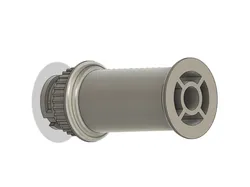
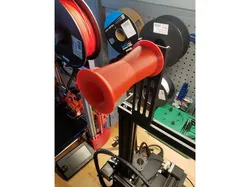
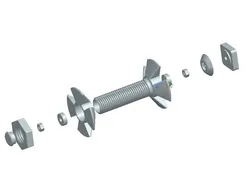
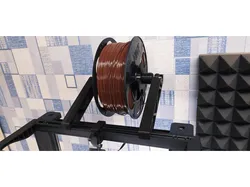
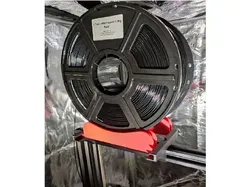
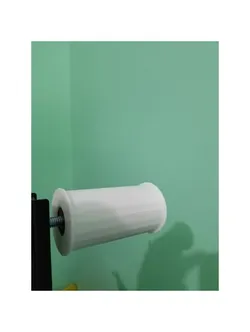
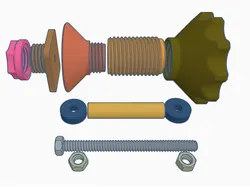
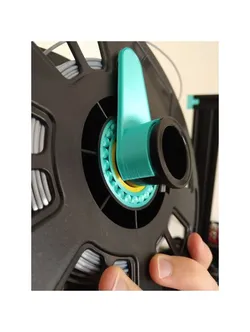
I know these have been done to death, however I wanted something more adjustable for my personal needs and thought others might like it as well. This thing is guaranteed to fit into the stock spool holder on an Ender 3 S1. Given the bolt length is variable, the length of the bolt will determine the length of the spool roller you should use.Hardware required(1) 1/2" x 1-1/8" bearing(1) 1/2" UNC bolt with coarse threads (length varies depending on roller)(1) 1/2" machine nut (locking nut preferred)Bolt sizes:1 KG - 3 1/2" bolt3 KG - 5 1/2" boltTools required(1) 3/4" wrench or socket(1) Hammer or malletI used an Xike 6205-2RSNR Lawn Mower Wheel Bearing I already had laying around the house so I didn't have to buy them specifically for this, as well as a Grip Fast® 1/2"-13 x 5-1/2" Zinc Grade 2 Hex Bolt for the bolt for the 3 KG spool roller.Printing instructionsThe following parts of this thing need to have some special considerations when printing them to ensure proper quality of the part size. Given these are functional parts, and some of the tolerances are quite close (0.2mm in some cases) your printer will need to be dialed in to print them. Unless otherwise mentioned, assume all parts of this thing must be printed in the same orientation as the image for the part.Coupler - This part needs a couple special settings to ensure the correct print quality and necessary strength when inserting the bearing. Failing to adhere to these will likely result in the print coming out wrong and the coupler breaking when the bearing is being installed.Make sure you print this part with the coupler opening facing upward!The Z-Seam MUST be random. This is critical to ensuring the strength of this part and prevents a critical failure point with the bearing.Supports MUST be enabled. There is a small groove in the part to fit into the stock holder. I found using Tree supports helped this tremendously.Roller - This part will take the longest to print, expect roughly 5-10 hours (time varies depending on printer settings and roller length).The Z-Seam SHOULD be random. Given it must support 1 - 3 KGs of printer filament, ensuring the part does not have a straight seem should help with the overall strength.Supports SHOULD be disabled. There is an expected overhang at the very end of the print, however printers should be able to print the fillet used without requiring supports be printed. If your printer cannot handle it, add the supports.Punch Tool - (Optional) This part needs to be printed with 100% infill, with the opening facing upward.Assembly instructionsTo assemble the coupler, place the bearing into the coupler ensuring to seat the bearing at the entrance hole for the coupler and use your fingers to press it into place. It should be tight. The included punch tool with this thing may be printed if it needs a bit more love to get it to seat. It should sit approximately 3mm below the surface.Place the cover on top of the bearing, it should be flush to the top of the coupler. This will enclose the bearing so it will not move.Slide the bolt through the back side of the coupler so the bolt head is completely recessed inside the coupler.Slide the spacer over the top of the bolt so that it sits on the bore of the bearing. It should sit within the cover placed earlier and rotate freely.Slide the roller over top of the bolt.Hand tighten the nut onto the threaded end of the bolt. If you need or desire to tighten it further, shoving a flat head screwdriver into the base of the coupler against the bolt head worked well.
Direct link to the original creator's page
Also Available On
More from jeff-winn
Similar Models
 Thingiverse
 Thingiverse
 Thingiverse
 Thingiverse
 Thingiverse
 Thingiverse
 Thingiverse
 Thingiverse
Model Specifications
Frequently Asked Questions
How do I download Ender 3 Spool Holder?
Click the "View on Thingiverse" button above to visit the original model page on Thingiverse. You can download the STL file directly from the creator's page for free.
What 3D printer can I use for this model?
This model is compatible with most FDM 3D printers (Creality Ender 3, Prusa MK3S+, Bambu Lab, etc.) and resin printers (Elegoo, Anycubic). Check the original page for recommended print settings and materials.
Is this 3D model free to download?
Yes, this model is available as a free download on Thingiverse. Some creators accept tips or donations.
Can I modify this file?
Check the license (see original page) on the original Thingiverse page. Most STL files can be modified using free software like Blender, TinkerCAD, or Meshmixer.